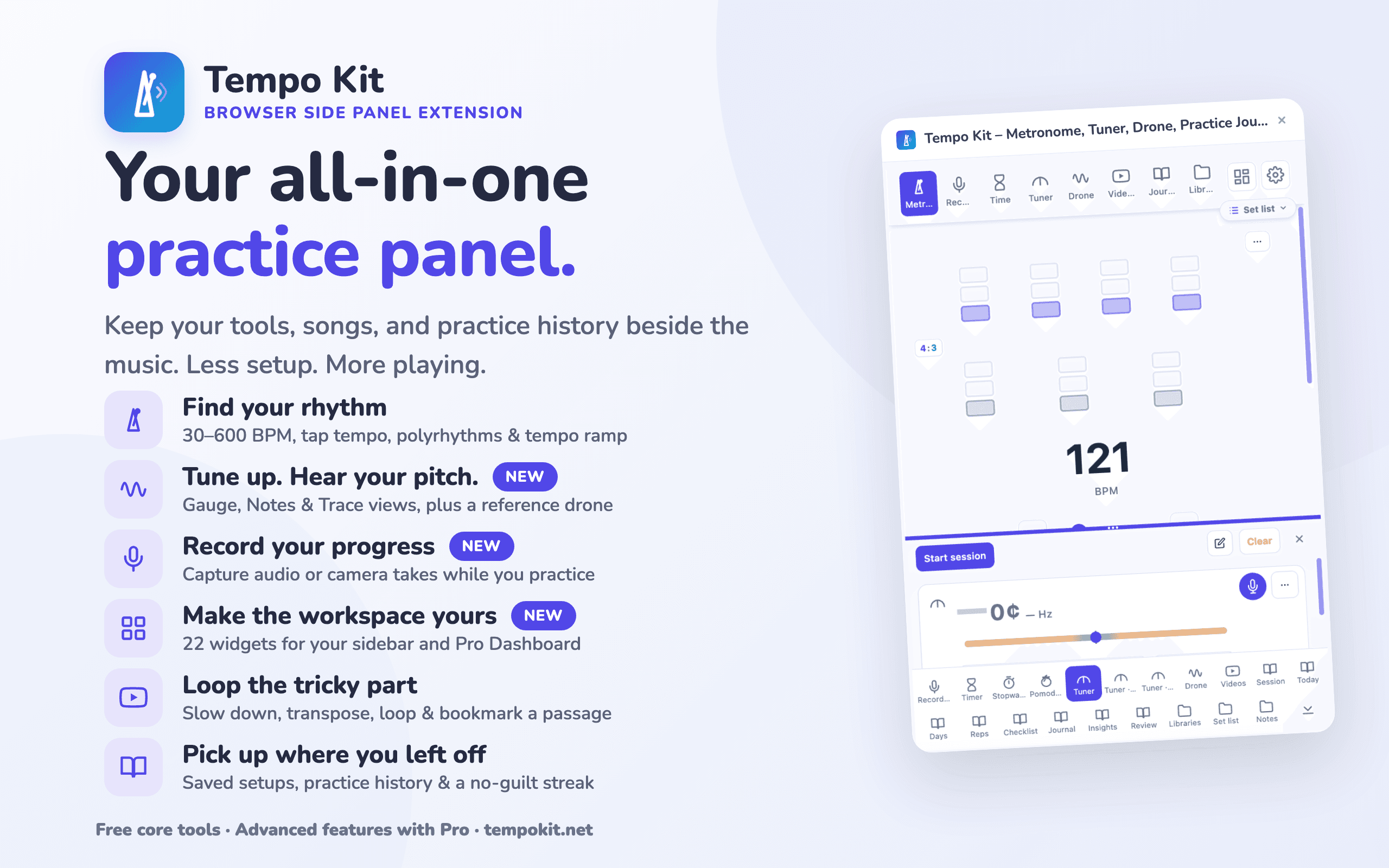
Every practice tool in one side panel.
Your journal writes itself.

Metronome, tuner, drone, timer, video controls, and more; all in one side panel beside the song you're learning. Record yourself and listen back. Your practice journal writes itself while you play. Every session adds up.

Chrome Web Store·Edge Add-ons

5.0 from 6 reviews on the Chrome Web Store

No account for the free core tools · Pro 3 day trial

Free core toolsOne side panelLocal-first toolsChrome, Edge & Brave
MetronomeChromatic TunerTimer & StopwatchYouTube PracticeBilibili PracticeJournalAuto log sessionPractice reviewAudio/Video PracticeLocal FilesA–B LoopsPitch TransposeSpeed ControlBPM DetectionPreset LibrarySet ListsPractice NotesMetronomeChromatic TunerTimer & StopwatchYouTube PracticeBilibili PracticeJournalAuto log sessionPractice reviewAudio/Video PracticeLocal FilesA–B LoopsPitch TransposeSpeed ControlBPM DetectionPreset LibrarySet ListsPractice Notes

Built for the way

musicians actually practice

Less switching. Less setup. More playing.

  1. Practice
  2. Reflect
  3. Review
  4. Plan
  5. Own your data
Tempo Kit practice insights: focus breakdown and year-long consistency heatmap
Tempo Kit practice journal, auto-logged
Tempo Kit Today plan: a practice checklist ticking off as you play, with a been-a-while reminder of what you have not touched
Practice JournalFREEPRO

Stop logging practice.
Start practicing.

Just play. Tempo Kit writes down the day, the minutes, the tempo you finally hit. So on the night you swear you're not getting any better, you can scroll back and watch yourself get better.

  • Auto-logs metronome, timer & video sessions on its own
  • Add tags, ratings, and notes when you want, or leave it hands-off
  • A Today plan shows what to work on, checking off as you play, and a reminder of what you have been neglecting
  • Heatmap, practice analysis, and weekly & monthly reviews
  • Turn a week, month, or year into a share-ready recap card
  • Your data stays yours. Export your practice history as PDF or JSON, and import your backup anytime.
Tempo Kit journal day with that day's recorded takes playable inside it
Tempo Kit practice recordings: named, tagged takes with a playback scrub bar
Practice RecordingsFREEPRO

Record a take.
Your biggest breakthrough is one playback away.

The metronome tells you where the beat is. A recording tells you how you actually sound. Press record while you practice; every take is named, tagged, and waiting in that day's journal page when you come back.

  • One tap to record, right beside the metronome and video controls
  • Name, tag, and search them; add a note to remember what to fix
  • Each journal day holds its own takes: play them back inside the day
  • Private by default, audio is saved on your device
Tempo Kit practice library presets
Tempo Kit practice notes popup
Your Practice, RememberedFREEPRO

Never set up twice.
Pick up where you left off.

One song, one preset: tempo, video, speed, pitch, loops, notes, saved together. Line them up in a set list, switch from any page, and tomorrow starts exactly where today ended.

  • 3 presets free · unlimited with Pro + folders
  • Set lists & drag-to-reorder
  • Pinned practice notes per preset
  • Export & import as a backup file
Tempo Kit YouTube practice controls
Video PracticePRO

Slow it down.
Loop it. Nail it.

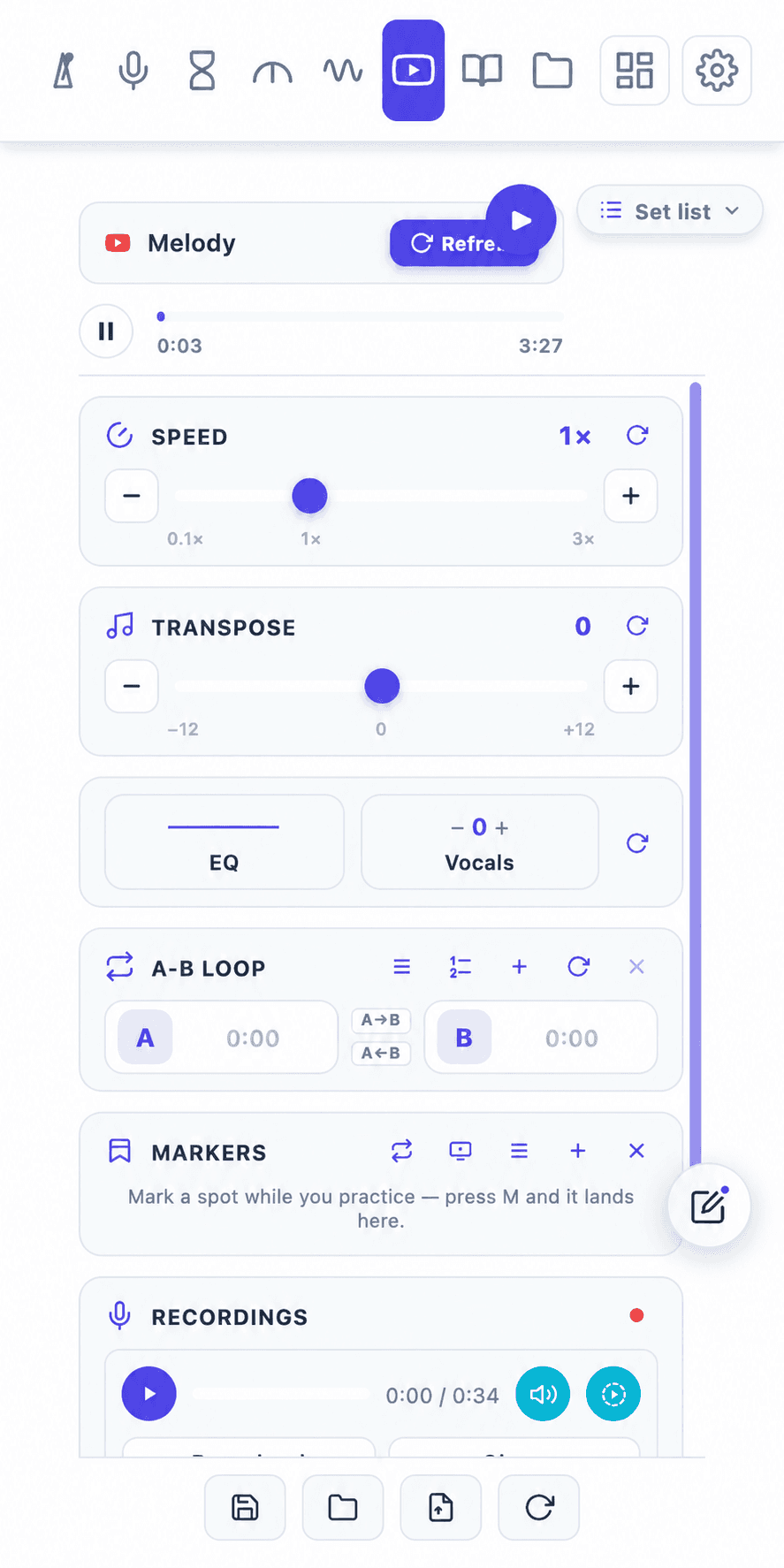
YouTube and Bilibili out of the box, or connect Spotify, Apple Music, almost any music tab. Slow the passage. Drop it into your key. Loop the two bars that keep escaping you, until they don't.

  • Speed 0.1×–3×, pitch ±12 semitones
  • 5-band EQ + vocal reduce or boost
  • A–B loops and BPM & Key detection
  • Press M to drop a marker on the passage you're drilling with a note, saved per video, and jump back to it later
  • YouTube, Bilibili, your own files, or any tab you connect
Tempo Kit drone playing a dominant chord on A, with intervals and timbre chips
DroneFREE

Hold one note.
Train your ears against it.

A sustained reference drone for intonation, ear training, and long tones. Pick a note, stack intervals into a full chord, choose a timbre, and it keeps sounding while you use the tuner, metronome, or videos.

  • Any root note and octave, with 12 stackable intervals (hear a full chord/scale)
  • Six timbres from pure sine to harmonic-rich tanpura
  • Keeps playing across tabs, with an auto-stop timer
  • Save your favourite drone setups and recall them in one tap
Tempo Kit chromatic tuner
Tempo Kit metronome with a 4:3 polyrhythm layer
Metronome + TunerFREEPRO

Keep steady time.
Stay in tune.

A full metronome (30 to 600 BPM, tap tempo, subdivisions, swing) and a chromatic tuner that shows note, cents, and Hz in real time. Your mic audio never leaves your device.

  • 30–600 BPM, subdivisions, tap tempo, swing feel, per-beat volume, 9 click sounds
  • Precount, tempo ramp & polyrhythm layer
  • Note, octave, cents & Hz · A4 reference 415–466 Hz
  • Tuner mic audio processed locally, never recorded
Tempo Kit timer and lap stopwatch together on one screen
Tempo Kit daily greeting showing the practice streak day count
Timer, Stopwatch & StreakFREE

Start the clock.
Showing up is the win.

Set a minute countdown to start, 10 minutes for the drill, let the stopwatch lap each take, or keep both on one screen. Then open the panel tomorrow and it says hello, and counts the day you showed up.

  • Countdown timer with quick presets, and a lap stopwatch
  • Show Timer, Stopwatch, or Both at once, and flip their directions
  • A daily greeting welcomes you everytime you open the panel
  • Counts every day you show up, never guilts a miss
  • Optional practice reminders on the days and time you pick
  • Six streak styles, and it all stays on your device

Less setup. More playing.

One side panel replaces your metronome, tuner, looper, drone, and practice notebook. Every tool inside, free and Pro.

Practice Journal
Auto-Logged Sessions
Today Plan
Practice Heatmap
Tempo Trends
Session Tags & Notes
Weekly/Monthly/Yearly Review
PDF Export
Recap Share Card
Practice Recordings
Takes in Your Journal/Video
Metronome
Tap Tempo
Different Sounds
Precount
Tempo Ramp
Polyrhythm
Daily Streak
Libraries
Save / Load Preset
Set Lists
Drag to Reorder
Pinned Notes
Import / Export
Video Practice
Speed Control
Pitch Transpose
A–B Loop
Video Markers
BPM & Key Detection
5-Band EQ
Vocal Reduce
Connect Any Tab
Local Files
Chromatic Tuner
Custom Tunings
Tuning Reference
Drone Notes
A4 Calibration
Stopwatch + Laps
Split Time View
Mini Tools
Countdown Timer
Custom Durations
Practice Reminders
Reorder Tabs
Multiple Languages
Light & Dark Theme
Keyboard Shortcuts
Privacy-First

Who it's for

One panel, different practice

The tools are the same. What you reach for depends entirely on what you're working on.

YouTube & Video Learner

Stop switching tabs while practicing

Watches song tutorials on YouTube while constantly pausing and switching tabs to a metronome or tuner. Tempo Kit puts speed control, pitch transpose, A–B loops, markers, tuner, and metronome right beside your video so you stay in flow.

Self-Reviewer & Recorder

Record takes & hear how you actually sound

Tired of guessing whether a passage is clean? Press record to capture a take on your device, listen back instantly with scrub controls, and keep recorded takes saved inside that day's journal.

Gigging Musicians & Performers

Setlists & one-tap preset recall

Rehearsing for a gig or stepping through a live setlist? Save your songs into ordered setlists with their exact BPM, count-in, tuning, and pinned performance notes. Switch from song to song in one tap without resetting your tools.

Data-Driven Student

Effortless proof of musical progress

Spreadsheets and paper logs feel like homework that gets abandoned by week two. Tempo Kit automatically logs your sessions, minutes, and tempos as you play, giving you heatmaps, tempo trends, and streak tracking without manual data entry.

Solo & Speed Driller

Break down the passages that fall apart

Isolate hard bars with A–B loops, drop playback speed down to 50% without altering pitch, and use Tempo Ramp to automatically step up BPM every few bars until the passage is effortless at full tempo.

Singers & Vocalists

Transpose key, reduce vocals & drone tune

Transpose backing tracks up or down ±12 semitones into your key, reduce lead vocals to hear yourself clearly over the mix, and use sustained reference drones to check your intonation on hard notes.

Reviews

What users are saying

5.0 from 6 reviews on the Chrome Web Store
Great practice kit, everything I need is right here. I've been looking for something like this for a long time. The journal is fantastic, the auto-log and setlist is very cool.
Eric
as a musician honestly i gotta say this is one of the best metronome apps ive used, perfect for a browser
Anthony Sgro
I just downloaded this and it works wonders with Youtube. It's one of the most useful extensions for my practice sessions, Thank You.
Leo
This is just so so so great and useful!!!!!!!! Helps me really stay focus
Shu
Woahhhhhh, this is lit. It helps me stay organized and get started faster, especially after a long day when I'm already tired and my brain is dead. I like how everything is in one place because I usually have trouble finding my tuner lolll, and it feels like work to keep switching and finding where those other tools are, when I just want to play and practice.
Lucy
I love the mini timer, stopwatch, and notes feature. They're incredibly handy while practicing with a metronome. Great extension!
Spark

Practicing with Tempo Kit? A review takes a minute and it's how other musicians find it.

Leave a review

Free to start. Pro is the full practice kit.

The metronome, tuner, timer, and practice journal are free, no account. Pro opens your full practice history with weekly and monthly reviews, unlimited saved songs with folders, every video practice control, your own tunings and timer presets, and every future Pro tool. Less setup, more playing.

🎁 Early supporter offerUse FOUNDING30 for 30% off until Sep 21, 2026

$3.49 monthly · $27.29 yearly · $69.99 lifetime

Paste it at checkout: open Tempo Kit → gear icon → pick a plan.

Free
$0no account
Add free
Pro
Monthly
$4.99
 
Most popular
Yearly
$38.99
~35% off
Best value
Lifetime
$99.99
Pay Once
Get Pro
Metronome (BPM, tap tempo, subdivisions)
Chromatic tuner
Timer & stopwatch
Mini control drawers
Metronome
Metronome + Videos
Saved presets
3 presets
Unlimited
Practice journal (auto-log, tags, plan)
Last 14 days + weekly review
Full history + weekly, monthly & yearly review

Cancelling never deletes anything. Your presets, tags, recordings and journal stay on your computer and stay editable. You can't add new ones past the free limit. Pro features themselves pause until you resubscribe.

FAQ

Frequently asked questions

Full setup help and docs also available on the Support page.

How does the 3-day Pro trial work?
Install Tempo Kit free, open the panel, and choose Try Pro free. That opens ExtensionPay's own page, which starts a 3-day trial on your email. Every Pro feature unlocks for those 3 days and returns to free after, with nothing charged unless you decide to subscribe. The trial starts inside the extension, not on this website, so install first.
What is the FOUNDING30 code?
It's an early-supporter thank-you: 30% off with the code FOUNDING30 at checkout, good until September 21, 2026. Enter it in the promo code field on the checkout page. Subscriptions renew at the normal price afterward.
Is Tempo Kit really free?
Yes. The metronome (with 9 click sounds and a no-guilt daily practice streak), chromatic tuner, countdown timer, stopwatch, and the practice journal are free core tools, no account needed. The journal auto-logs your sessions, takes tags, ratings and notes, runs the Today plan, and exports to PDF or JSON without paying a cent. Pro unlocks video practice tools (speed, pitch, 5-band EQ, vocal reduce, A-B loop, BPM & key detection) for YouTube, Bilibili, your own files, and almost any music tab you connect, including Spotify and Apple Music on the web, plus polyrhythm layering, unlimited saved presets, folder organization, and the deeper journal: history beyond 14 days, the year-at-a-glance heatmap, per-piece tempo trends, and the weekly & monthly reviews. Practice notes, set lists with quick preset switching, drag-to-reorder, and one-click export/import of libraries work on every plan too.
What can I practice with?
Video practice works with YouTube and Bilibili out of the box. They are the tested, supported sources. You can also practice with your own audio or video files in the Practice Player, or connect another standard web player when the site allows browser extension control. Use one connected video at a time. You can also follow along with sheet music in the Score Viewer, or log your practice sessions in the Journal.
How is Tempo Kit different from a speed or pitch extension?
Speed-and-pitch extensions control playback, and Tempo Kit does that too: speed, transpose, A–B loop, EQ, vocal reduce, BPM and key detection. The difference is everything around the playback. A slider changes the song; Tempo Kit runs the session, with a full metronome (30–600 BPM, subdivisions, swing, polyrhythm, 9 click sounds), a chromatic tuner reading cents and Hz, a timer and stopwatch, and presets with set lists and notes that restore your whole setup in one click. Then it remembers: sessions log themselves, so months of practice turn into a history you can actually look back on. That's the part a playback extension isn't built for, because it would have to become a practice app first. If you just want to drop a song a step, a free slider is fine. If you practice most days, Tempo Kit replaces the looper, the metronome site, the tuner app, and the notes doc at once, and keeps the record of it on your own device.
When does Pro activate after I buy it?
Tempo Kit checks your ExtensionPay status when the extension opens and when you return from checkout. If Pro does not appear immediately, close and reopen the extension. If it still shows as free, open Settings and choose Restore Pro. ExtensionPay will ask for the purchase email on its own secure page.
Does Tempo Kit record my audio?
Only when you press record. Practice recordings capture your microphone so you can listen back to yourself, and the audio is saved on your own device. It is never uploaded to us or anyone else, and you can delete any take at any time. Nothing else records: the tuner uses your microphone for real-time pitch detection only, BPM detection analyses tab audio temporarily, and local files in the Practice Player are played entirely on your device. None of those are recorded, stored, or sent anywhere.
What is the refund policy?
You may cancel your subscription at any time. Cancellation stops future renewals, but Pro access continues until the end of your current billing period. We generally do not provide prorated refunds for unused subscription time, but may issue refunds for duplicate charges, billing errors, or serious technical problems at our discretion. View our full Cancellation & Refunds Policy.
How do I cancel a subscription?
Open Tempo Kit → Settings → Manage Subscription. This opens the subscription management page (powered by Stripe) where you can cancel. After cancellation, Pro access continues until the end of your paid billing period.

Still have questions?

Visit the Support & Docs page
Tempo Kit
Tempo Kit
8-in-1 side panel

Ready to practice without
switching tabs/apps?

Start free. Upgrade to Pro when you want faster practice, powerful video controls, unlimited presets, and a richer practice journal.

Chrome Web Store·Edge Add-ons