In this guide
How to Read a Tuner: Which Way to Turn
A tuner tells you three things at once and nobody explains any of them. Here is what the note name, the number, and the needle each mean, and how to know which way to turn the peg without guessing and checking.
6 min read
The short answer
The big letter is the nearest note. The number is how far off you are in cents (hundredths of a semitone) where positive means sharp (too high, loosen) and negative means flat (too low, tighten). The needle is the same number drawn as a picture. Aim for the middle, finish by tuning up to it, and stop worrying below about five cents.
Every tuning guide starts at “play the low E and match it.” That skips the part beginners actually get stuck on, which is that the display is showing three different measurements of the same note and using none of the words you would use out loud.
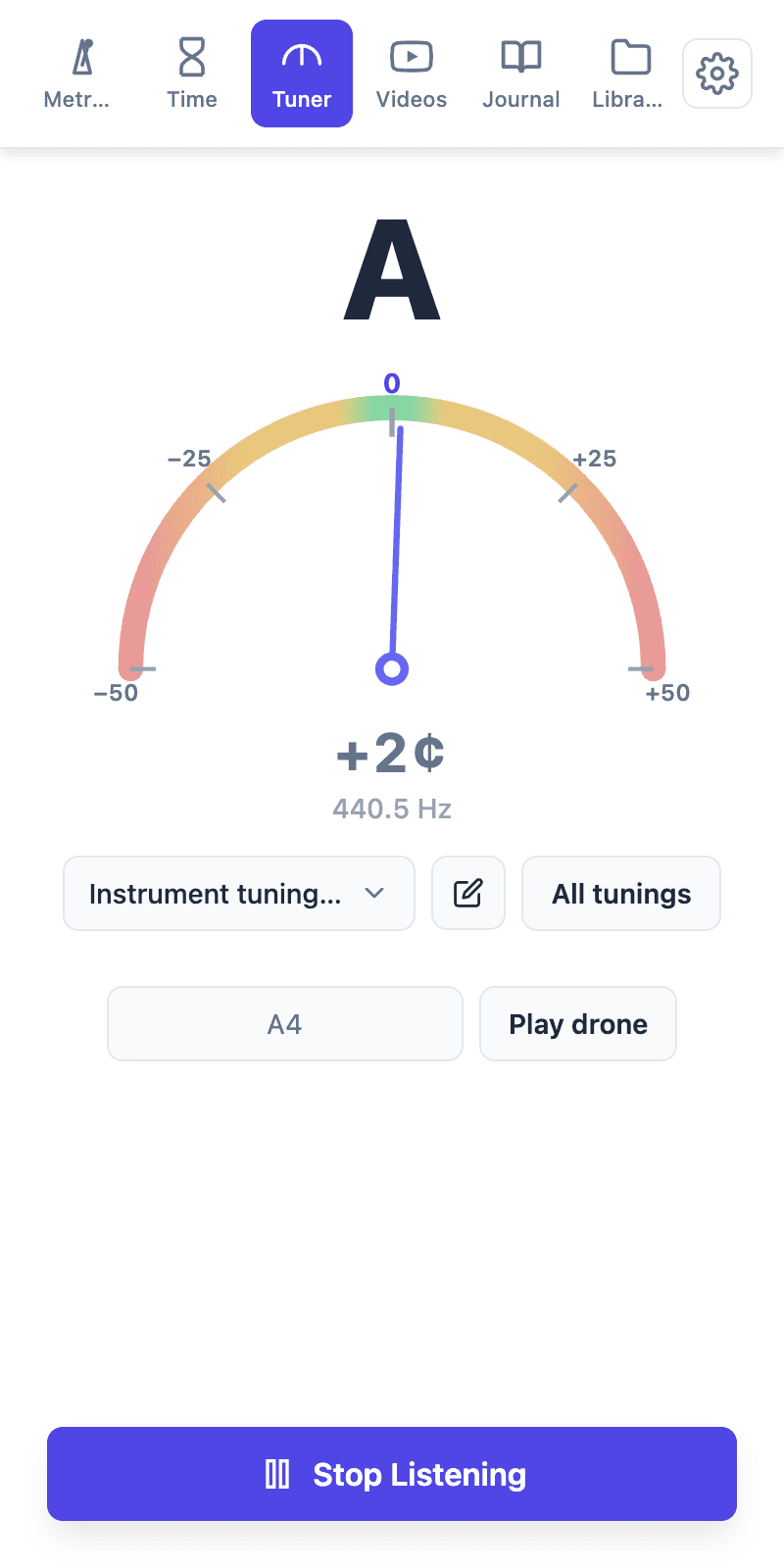
The three readouts, in the order you should read them
- The note name. The nearest named note to whatever you just played, not the note you meant to play. This is the first thing to check and the one people skip: if you are tuning the fifth string and the tuner says G, do not touch the number, because you are about to tune a wildly flat A to the wrong note entirely. The small number next to it is the octave (A4 is the A above middle C, A2 is two octaves below it) and it is worth a glance on the low strings, where a tuner that has latched onto an overtone reads the right letter in the wrong octave.
- The needle. A picture of how far off you are, so you can read it from across the room while both hands are busy. Left of centre is flat, right is sharp, middle is the note. That is the whole vocabulary.
- The cents. The number the needle is drawn from. A cent is one hundredth of a semitone, which makes 100 cents the distance from one fret to the next. So +2¢ is two hundredths of a fret sharp, a distance you cannot see on the instrument and can barely hear alone, which is exactly why the tuner exists.
The dial in the picture runs from −50 to +50, and that span is not arbitrary: it is one semitone, half of it on each side. At 50 cents you are exactly between two notes, and one cent further the tuner will relabel the note and swing the needle to the far side. If the needle ever slams from one end to the other, that is what happened: you crossed the border, not the tuner malfunctioning.
Hz: the same fact in physics units
The frequency underneath is the raw measurement, in vibrations per second. In the screenshot the tuner heard 440.5 Hz and called it A, +2¢. Those are not two findings; they are one. Concert-pitch A is 440 Hz, and two cents above it works out to 440.5 Hz.
For ordinary tuning you can ignore the Hz entirely. Cents are easier to act on, because cents are the same size everywhere and hertz are not. Two cents is two cents on your low E and on your top string, but measured in hertz that same error is 0.1 Hz down on the low E and 0.4 Hz on the high one. It becomes useful in exactly one situation: when the target itself is not 440: an orchestra at 442, baroque repertoire at 415, or a recording that was never at concert pitch in the first place. That is a whole subject of its own, in why A is 440 Hz and when to change it.
Sharp, flat, and which way to turn
The two words are just “too high” and “too low,” and once they are attached to a direction the guessing stops:
- Positive number, needle right: you are sharp. The string is too tight. Loosen it.
- Negative number, needle left: you are flat. The string is too loose. Tighten it.
- Overshoot on purpose, then come up. If you need to come down, go a little below the note and tune up into it. A string tightened into place holds; one lowered into place has slack left in the winding and drifts flat again in the first minute of playing.
- Move in small turns and re-pluck. The reading only means something while the note is actually sounding. Turn, pluck, read, not turn, turn, turn, wonder.
If your pegs turn the opposite way to what you expect (and on half the instruments out there they do) do not memorise a direction. Memorise tighter and looser, and let the tuner tell you which one you need.
Why the reading will not sit still
A jumping tuner is almost never broken. It is being asked to name a pitch that is not clearly there:
- You are reading the attack. The first instant of a plucked or bowed note is a burst of noise, and the pitch only settles a moment later. Pluck, wait half a second, then read.
- Something else is ringing. Neighbouring strings sound sympathetically and the tuner hears the loudest thing, not the thing you care about. Damp everything you are not tuning.
- The note has died. As it fades there is less signal than room noise, and the reading wanders off. Tune the first half of the note, not the tail.
- It is a low string. Low notes carry surprisingly little energy at their own fundamental frequency, and tuners can lock onto an overtone instead, which is why a low E sometimes reads as an E an octave up, or refuses to settle at all. Play it softer, not harder; a hard pluck on a low string is sharp for the first moment anyway.
Green is not the same as in tune
Getting all six strings to the middle of the dial is the start, not the finish. A guitar where every string reads dead centre can still sound sour, because fretting a note bends it slightly sharp, and how much depends on your hand, the action, intonation, and where you are on the neck. Chasing the last two cents on an open string does not survive contact with a barre chord.
So: inside five cents, move on. Then play the chord you actually care about and listen. If it still sounds wrong with every string green, the problem is not the tuning and there is a whole section on it in the online tuner guide. The step-by-step for a specific instrument lives in how to tune a guitar, with bass, ukulele and violin alongside it.
Tuning by ear, once the display makes sense
The readout is training wheels for something you can eventually do without it. Once you know what two cents looks like, the next step is hearing it: play a drone on the note you are aiming at and listen for the slow wobble between the two pitches, which slows and disappears as you come into tune. That is practicing with a drone, and it is the same skill the tuner has been measuring for you all along.
Common questions
What do cents mean on a tuner?
Am I sharp or flat, and which way do I turn?
What does the Hz number mean?
Why does the tuner keep jumping between notes?
How close is close enough?
Or skip the setup and practice in one panel
Tempo Kit puts the metronome, tuner, drone, timer, and the video controls in a single browser side panel beside whatever you're learning, and logs the session for you while you play. Free core tools, no account.
Keep reading
Free Online Metronome for Music Practice
A metronome you can use on this page right now, plus what to look for in one (subdivisions, accents, tempo ramps) and why a browser tab is a bad place to keep it.
Free Online Tuner for Guitar and 20+ Instruments
How browser tuners work, why yours reads the wrong string, and what to do when the note is right but the chord still sounds wrong.
Metronome BPM Chart: Tempo Markings Explained
Largo to prestissimo with real BPM ranges, the modifiers that bend them, and a metronome on the page so you can hear any tempo you just read about.
How to practice Guitar with YouTube: Full Setup
The whole session, start to finish: tune, set the click, slow the passage, loop it, and keep a record. Works for any instrument, not just guitar.
How to practice with a Drone for Better Intonation
The oldest intonation tool there is, and the one most people skip. Tune your guitar to it by ear, practice scales over it, and hear every note against something fixed.
How to Slow Down a YouTube Video to Practice
The built-in speed menu, the keyboard shortcut nobody uses, and how to slow a passage past 0.25× without it sounding underwater.