Tempo Kit Tuner Gauge, Notes, and Trace: Which View to Use
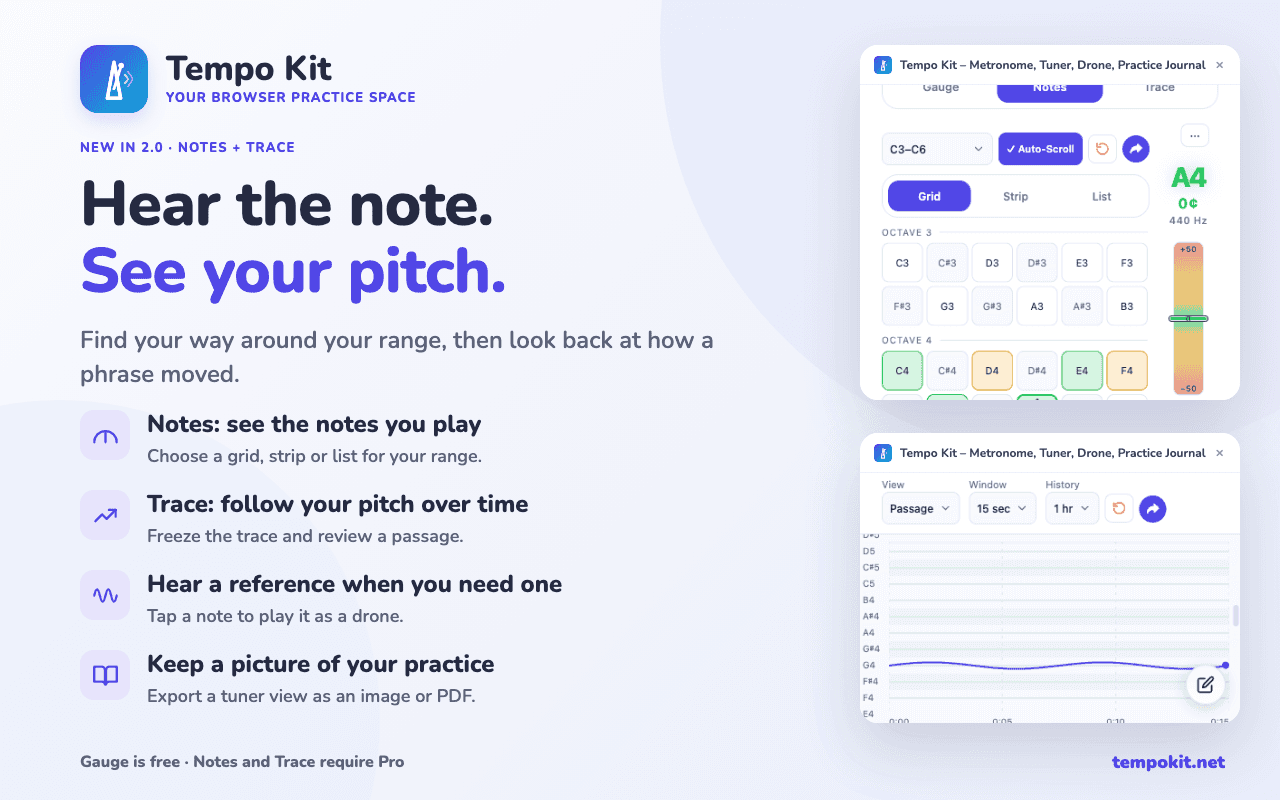
Tempo Kit 2.0 gives the tuner three ways to see pitch. Gauge shows the familiar live reading; Notes maps the pitches across your range; and Trace shows how your pitch moves over time. Together, they can be used not only for tuning, but also for intonation practice.
3 min read
Gauge for the Note Right Now
Gauge is the familiar free tuner view. Use it to tune a string or check a note in the moment, reading the detected note and cents rather than relying only on the needle.
It is also useful for simple intonation drills: sustain a note, watch how close you stay to the center, then try the same note again without watching the tuner first.
For the basics, start with how to read a tuner.
Notes for Moving Around Your Range
Notes lays pitches out as a grid, strip, or list so you can scan the range you are working in. Tap a note to hear it as a drone. The note you play lights up with its own cents bar, which is useful when you are moving between targets instead of tuning one sustained note.
That makes Notes especially useful for intonation practice across scales, intervals, arpeggios, shifts, or a passage with several target pitches. You can hear a reference note, play it back, and see how close each note lands.
Notes is a Pro view.
Trace for a Whole Passage
Trace draws your pitch as a line over a window from 15 minutes to two hours. Freeze the view and scrub back to inspect a phrase you just played.
Instead of seeing only whether one note is sharp or flat right now, you can see how your intonation changes through a sustained note, scale, shift, bend, vocal phrase, or longer passage. A wobble, scoop, unstable attack, or slow drift becomes easier to spot when you can see the pitch path rather than a single instant.
For intonation practice, try playing the phrase once naturally, look for places where the pitch consistently drifts, then repeat the same passage and compare what you hear and feel. You can also record a camera take to review your sound alongside posture and hand movement.
Trace is a Pro view.
For a drill that adds rhythm to pitch practice, try combining the tuner and metronome for intonation practice.
Or skip the setup and practice in one panel
Tempo Kit puts the metronome, tuner, drone, timer, and the video controls in a single browser side panel beside whatever you're learning, and logs the session for you while you play. Free core tools, no account.
Keep reading
Free Online Metronome for Music Practice
A metronome you can use on this page right now, plus what to look for in one (subdivisions, accents, tempo ramps) and why a browser tab is a bad place to keep it.
Browser Guitar Tuner: Setup and Troubleshooting
How browser tuners work, why yours reads the wrong string, and what to do when the note is right but the chord still sounds wrong.
How to Read a Tuner: Which Way to Turn
The number, the needle, and the note name: what each one is telling you, and how to know whether you are sharp or flat without guessing.
Metronome BPM Chart: Tempo Markings Explained
Largo to prestissimo with real BPM ranges, the modifiers that bend them, and a metronome on the page so you can hear any tempo you just read about.
Tempo Kit 2.0: Custom Dashboards, Widgets, Pomodoro & Full-Screen Practice
Build your own practice workspace in the side panel or Dashboard. Arrange 22 widgets, create pages for different routines, count reps, run focus cycles, and give individual tools the whole screen.
Camera Recordings in Tempo Kit 2.0: Review and Keep Your Takes
Record a camera take, play it back, download it, and keep useful recordings with your practice.